> ## Documentation Index
> Fetch the complete documentation index at: https://docs.rafftechnologies.com/llms.txt
> Use this file to discover all available pages before exploring further.
# Install an app from App Hub
> Install, configure, expose and upgrade Helm charts from the dashboard
Updated August 24, 2026
App Hub installs popular Helm charts into your cluster. Available apps include Argo CD, Grafana, cert-manager, Sealed Secrets, PostgreSQL, MySQL, Redis, MongoDB, n8n, NextCloud, Mattermost, Loki and kube-prometheus-stack. Apps are free — they run on your existing nodes, and only the nodes bill.
## Install
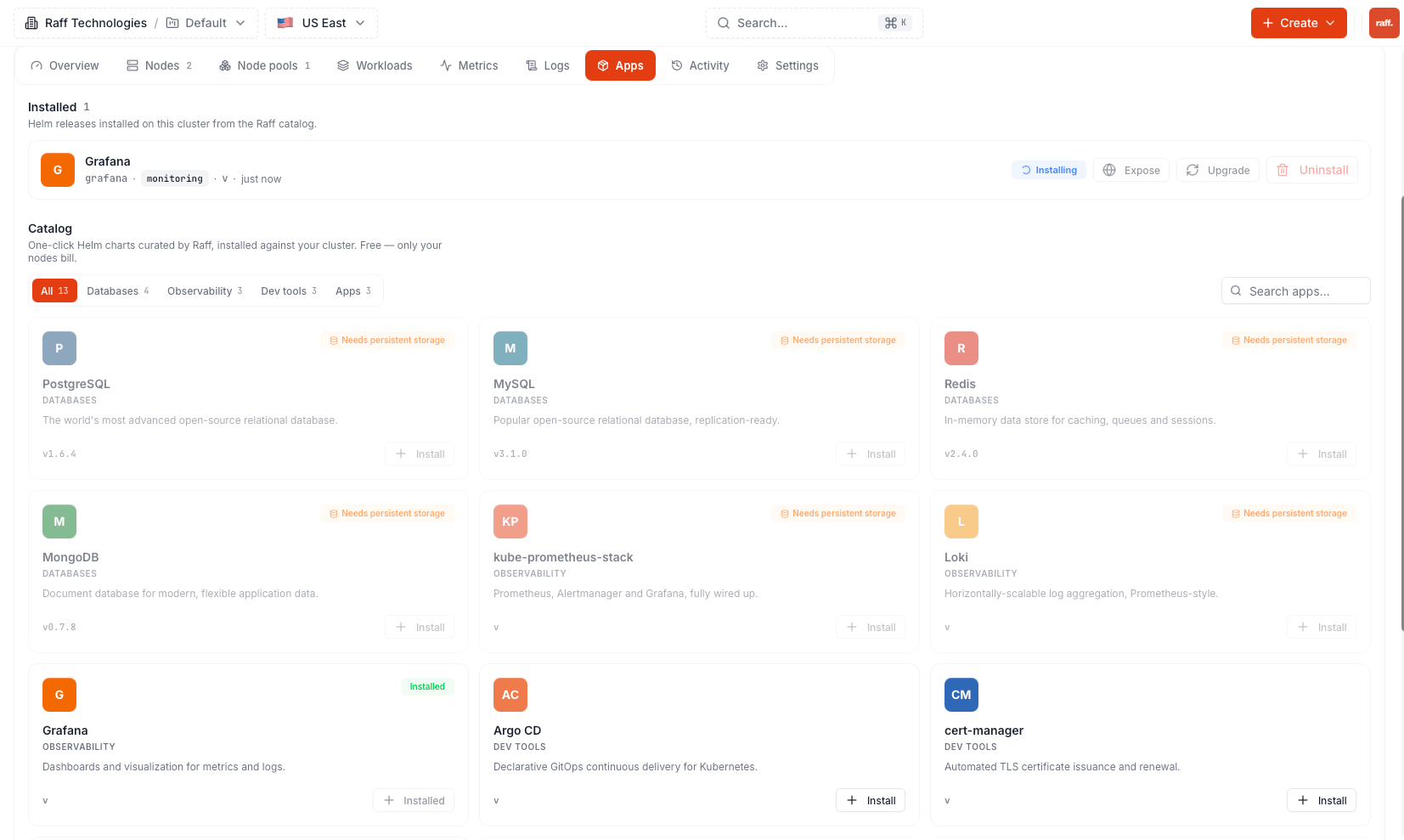
On the cluster page, open **Apps** and pick an app from the catalog.
 The install dialog has three fields:
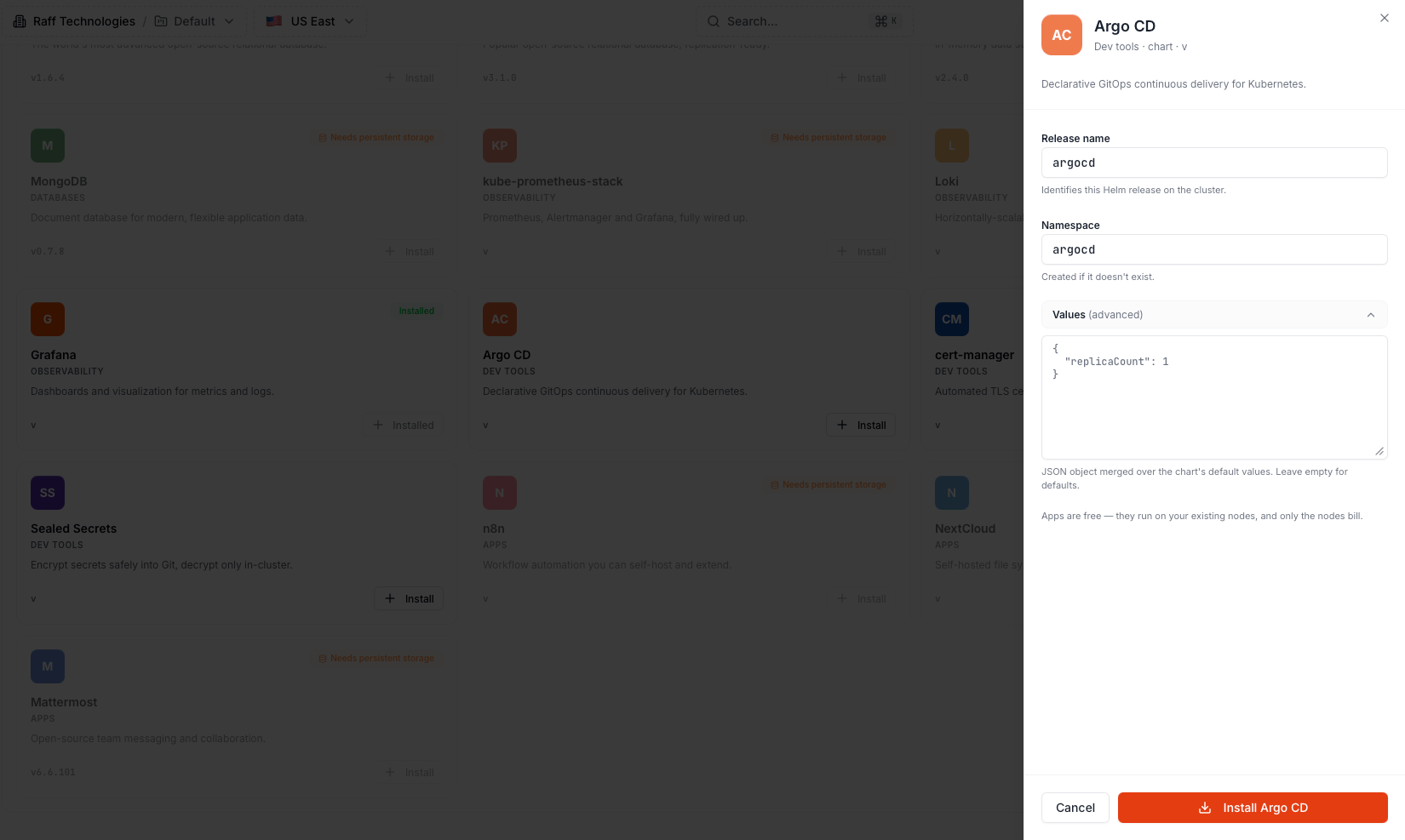 * **Release name** — the Helm release name, and part of the app's public URL if you expose it later. Lowercase letters, digits and hyphens, up to 53 characters, unique per cluster. Keep the default unless you install the same app twice.
* **Namespace** — the Kubernetes namespace the app installs into. Created automatically if it does not exist. Each app defaults to its own namespace, which keeps uninstalls clean.
* **Values (advanced)** — a JSON object merged over the chart's default values, passed to Helm as-is. Use the chart's own value names (for example, Grafana uses `replicas`, not `replicaCount`) — the **Chart documentation and available values** link inside this section opens the chart's docs. Leave empty for defaults. Limit: 64 KB.
Clicking **Install** creates the release in the background: the chart is fetched from its repository and installed with a 5-minute timeout. The card shows **Installing**, then **Active** or **Failed**. Every step is recorded in the cluster's Activity feed.
Apps marked **Needs persistent storage** (databases, NextCloud, …) can only be installed on clusters with [storage nodes](/products/build/kubernetes/concepts/storage); the install is rejected otherwise.
## Credentials
Database apps (PostgreSQL, MySQL, Redis, MongoDB) get a generated password at install time. It is stored only inside your cluster, in a Secret named `-raff-creds` in the app's namespace — never on Raff's side. Click **Credentials** on the installed app to reveal the username, password and in-cluster host (`..svc.cluster.local`). The password stays the same across upgrades.
## Expose (publish)
**An installed app is not public.** Until you expose it, it is reachable only from inside the cluster — no URL, no open port. Exposing is the explicit step that opens it to the internet.
Each installed app has three actions — **Expose**, **Upgrade**, **Uninstall**:
* **Release name** — the Helm release name, and part of the app's public URL if you expose it later. Lowercase letters, digits and hyphens, up to 53 characters, unique per cluster. Keep the default unless you install the same app twice.
* **Namespace** — the Kubernetes namespace the app installs into. Created automatically if it does not exist. Each app defaults to its own namespace, which keeps uninstalls clean.
* **Values (advanced)** — a JSON object merged over the chart's default values, passed to Helm as-is. Use the chart's own value names (for example, Grafana uses `replicas`, not `replicaCount`) — the **Chart documentation and available values** link inside this section opens the chart's docs. Leave empty for defaults. Limit: 64 KB.
Clicking **Install** creates the release in the background: the chart is fetched from its repository and installed with a 5-minute timeout. The card shows **Installing**, then **Active** or **Failed**. Every step is recorded in the cluster's Activity feed.
Apps marked **Needs persistent storage** (databases, NextCloud, …) can only be installed on clusters with [storage nodes](/products/build/kubernetes/concepts/storage); the install is rejected otherwise.
## Credentials
Database apps (PostgreSQL, MySQL, Redis, MongoDB) get a generated password at install time. It is stored only inside your cluster, in a Secret named `-raff-creds` in the app's namespace — never on Raff's side. Click **Credentials** on the installed app to reveal the username, password and in-cluster host (`..svc.cluster.local`). The password stays the same across upgrades.
## Expose (publish)
**An installed app is not public.** Until you expose it, it is reachable only from inside the cluster — no URL, no open port. Exposing is the explicit step that opens it to the internet.
Each installed app has three actions — **Expose**, **Upgrade**, **Uninstall**:
 Two ways to expose:
* **HTTPS** — click **Expose**. This creates an Ingress routed through Traefik at `https://..k8s.raffusercloud.com` and returns the URL immediately. A Let's Encrypt certificate is issued automatically; on the first exposure of a cluster this takes a few minutes, during which the URL serves a placeholder certificate. Requires the Traefik add-on.
* **TCP** — for apps that should be reached on a raw port (databases). The app's LoadBalancer service gets a public port on the cluster's IP, forwarded by the gateway. Requires the MetalLB add-on. Active ports are listed under **Settings → Public TCP ports**.
**Unexpose** removes the route or port and the app is no longer reachable from the internet. The app keeps running inside the cluster either way.
For your own workloads (not App Hub apps), see [Expose a service](/products/build/kubernetes/quickstart-guides/expose-a-service).
## Upgrade / reconfigure
**Upgrade** re-runs the chart in place with the catalog's current chart version and your values merged over the defaults. Use it for two things:
* **Change configuration** — edit the values JSON in the upgrade dialog; the release is updated without reinstalling and without data loss.
* **Pick up chart updates** — when the catalog carries a newer chart version, Upgrade moves the release to it.
The card shows **Upgrading**, then **Active** or **Failed**. Persistent data (volumes, generated credentials) survives upgrades. Uninstall removes the release and its namespace resources; data on persistent volumes is deleted with it.
Two ways to expose:
* **HTTPS** — click **Expose**. This creates an Ingress routed through Traefik at `https://..k8s.raffusercloud.com` and returns the URL immediately. A Let's Encrypt certificate is issued automatically; on the first exposure of a cluster this takes a few minutes, during which the URL serves a placeholder certificate. Requires the Traefik add-on.
* **TCP** — for apps that should be reached on a raw port (databases). The app's LoadBalancer service gets a public port on the cluster's IP, forwarded by the gateway. Requires the MetalLB add-on. Active ports are listed under **Settings → Public TCP ports**.
**Unexpose** removes the route or port and the app is no longer reachable from the internet. The app keeps running inside the cluster either way.
For your own workloads (not App Hub apps), see [Expose a service](/products/build/kubernetes/quickstart-guides/expose-a-service).
## Upgrade / reconfigure
**Upgrade** re-runs the chart in place with the catalog's current chart version and your values merged over the defaults. Use it for two things:
* **Change configuration** — edit the values JSON in the upgrade dialog; the release is updated without reinstalling and without data loss.
* **Pick up chart updates** — when the catalog carries a newer chart version, Upgrade moves the release to it.
The card shows **Upgrading**, then **Active** or **Failed**. Persistent data (volumes, generated credentials) survives upgrades. Uninstall removes the release and its namespace resources; data on persistent volumes is deleted with it.