> ## Documentation Index
> Fetch the complete documentation index at: https://docs.rafftechnologies.com/llms.txt
> Use this file to discover all available pages before exploring further.
# Set public or private
> Bucket-level ACL, bucket policies (JSON), per-object ACL, and presigned URLs — three layers that combine to control who can read what
Updated May 8, 2026
Raff Object Storage controls access at three levels, and they combine. **Default everything to private.** Only flip something public when the data's whole purpose is to be served to unauthenticated readers — and even then, prefer a per-object public override on a private bucket.
## The three layers
| Layer | Where | Scope | Best for |
| ----------------- | ----------------------------------- | ---------------------------------------- | -------------------------------------------------------------------------- |
| **Bucket ACL** | Permissions tab → Change ACL | Whole bucket — every object inherits | Buckets that exist to serve public content (static sites, public assets) |
| **Bucket Policy** | Permissions tab → Bucket Policy | Whole bucket — flexible JSON-based rules | Conditional access (IP-restricted, HTTPS-only, deny-delete, folder-scoped) |
| **Object ACL** | Object detail page → Access control | Single object | Sharing one file from an otherwise private bucket |
Layered access is **most permissive** — if any layer grants read, the read succeeds. Public bucket + private object usually still ends up public; private bucket + public object exposes that one object only.
A fourth option — **presigned URLs** — sits outside this model and is covered at the bottom.
## Open the Permissions tab
All bucket-level access controls live on the bucket detail page's **Permissions** tab.
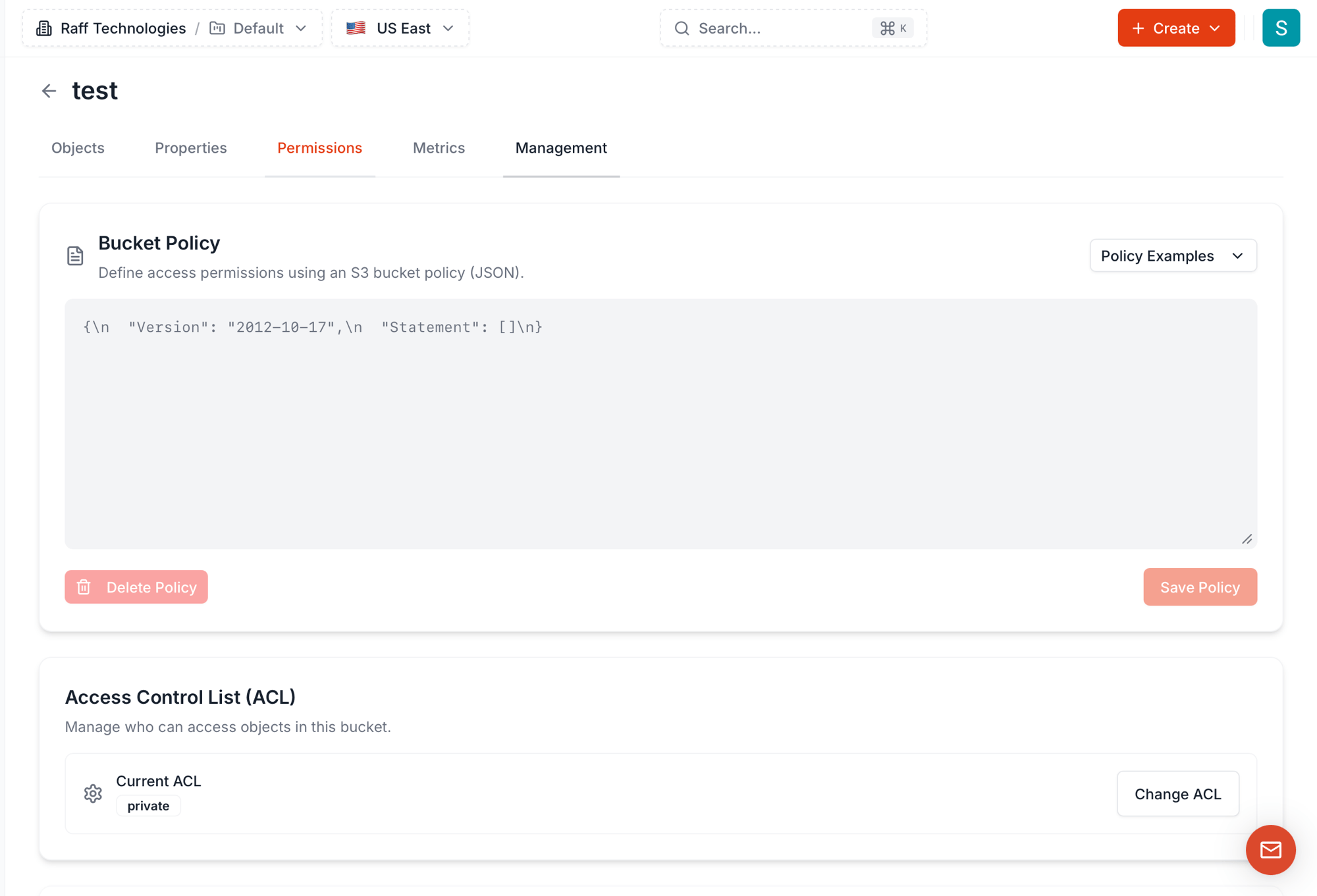 The tab has two sections:
* **Bucket Policy** — JSON-based access rules with **7 ready-to-use templates**
* **Access Control List (ACL)** — coarse-grained bucket-wide permission level, four options
## Bucket ACL — the four options
Click **Change ACL** to open the picker.
The tab has two sections:
* **Bucket Policy** — JSON-based access rules with **7 ready-to-use templates**
* **Access Control List (ACL)** — coarse-grained bucket-wide permission level, four options
## Bucket ACL — the four options
Click **Change ACL** to open the picker.
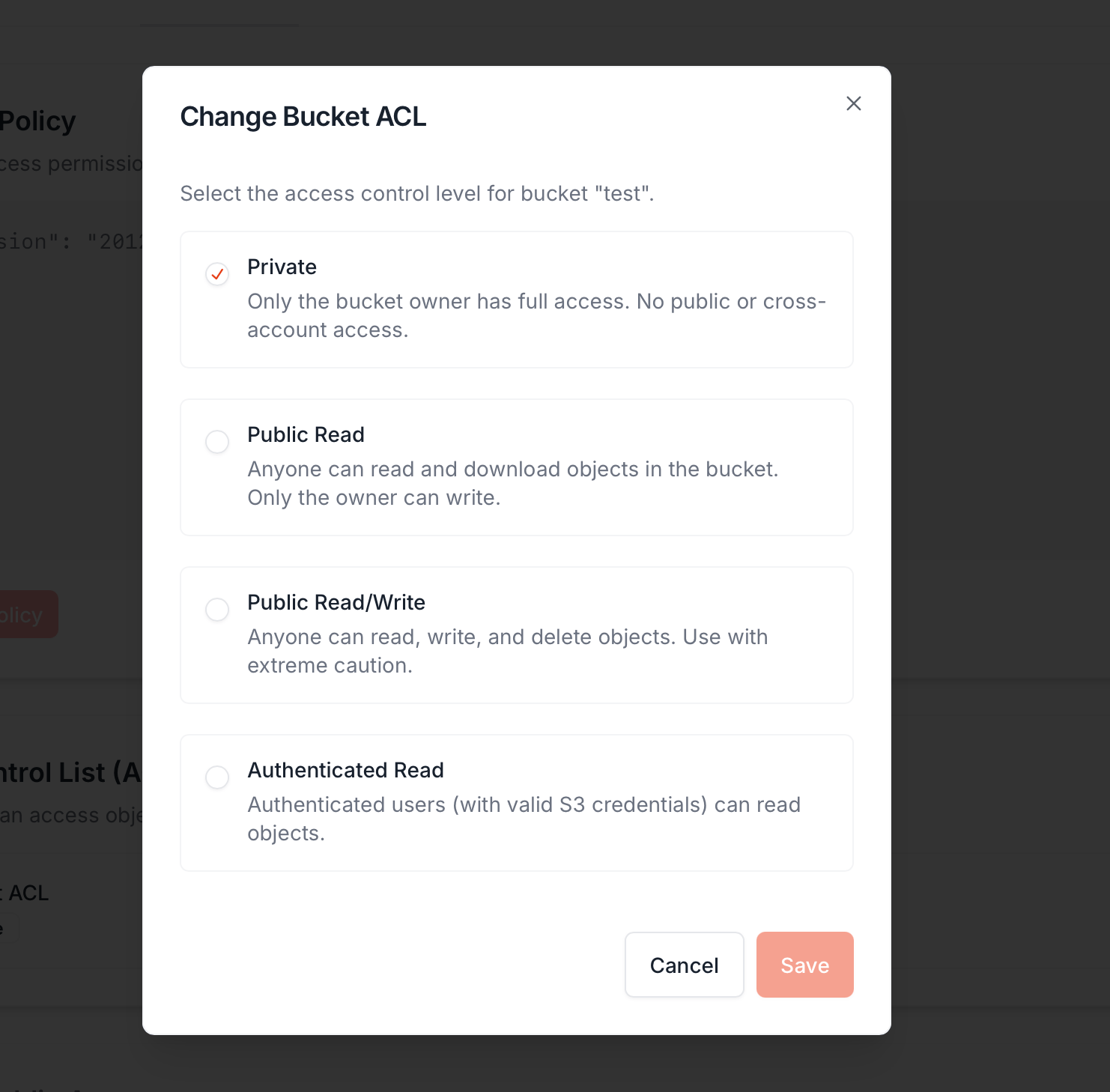 | ACL | What it does | When to use |
| ---------------------- | ------------------------------------------------------------------------------------ | ------------------------------------------------------------------------------------------------------------ |
| **Private** (default) | Only the bucket owner has full access. No public or cross-account read or write. | Default — anything that isn't a public asset bucket |
| **Public Read** | Anyone can read and download objects via their Object URL. Only the owner can write. | Static site hosting, public CDN origin, public download distribution |
| **Public Read/Write** | Anyone can read, write, and delete. Use with **extreme caution**. | Almost never. Anonymous bug-bounty drop boxes, intentional one-shot fileshares — and even then, probably not |
| **Authenticated Read** | Anyone with valid S3 credentials (any Raff account, any AWS account) can read. | Multi-tenant collaboration without making data fully public |
**Bucket-level ACL is bucket-wide.** If you flip a bucket to **Public Read**, **every object in it becomes publicly readable** — current and future — unless that object has an explicit `private` override at the object level. Customer uploads, internal logs, anything you missed: all of it goes live.
**We do not recommend public ACL on a bucket** unless the bucket's entire purpose is public hosting. The safer pattern is to keep the bucket **Private** and override only the specific objects that need to be public on the object detail page.
## Bucket Policy — the JSON rules
The **Bucket Policy** section accepts an S3-style JSON policy document. It lets you express things ACLs can't:
* "Allow uploads only from these IP ranges"
* "Deny all delete operations on this bucket"
* "Force HTTPS — block plain HTTP requests"
* "Public for read, but only the owner can write"
* "Limit access to objects under one folder prefix"
The default empty policy is `{"Version": "2012-10-17", "Statement": []}` — no rules. Add statements directly, or pick a template from the **Policy Examples** dropdown:
| ACL | What it does | When to use |
| ---------------------- | ------------------------------------------------------------------------------------ | ------------------------------------------------------------------------------------------------------------ |
| **Private** (default) | Only the bucket owner has full access. No public or cross-account read or write. | Default — anything that isn't a public asset bucket |
| **Public Read** | Anyone can read and download objects via their Object URL. Only the owner can write. | Static site hosting, public CDN origin, public download distribution |
| **Public Read/Write** | Anyone can read, write, and delete. Use with **extreme caution**. | Almost never. Anonymous bug-bounty drop boxes, intentional one-shot fileshares — and even then, probably not |
| **Authenticated Read** | Anyone with valid S3 credentials (any Raff account, any AWS account) can read. | Multi-tenant collaboration without making data fully public |
**Bucket-level ACL is bucket-wide.** If you flip a bucket to **Public Read**, **every object in it becomes publicly readable** — current and future — unless that object has an explicit `private` override at the object level. Customer uploads, internal logs, anything you missed: all of it goes live.
**We do not recommend public ACL on a bucket** unless the bucket's entire purpose is public hosting. The safer pattern is to keep the bucket **Private** and override only the specific objects that need to be public on the object detail page.
## Bucket Policy — the JSON rules
The **Bucket Policy** section accepts an S3-style JSON policy document. It lets you express things ACLs can't:
* "Allow uploads only from these IP ranges"
* "Deny all delete operations on this bucket"
* "Force HTTPS — block plain HTTP requests"
* "Public for read, but only the owner can write"
* "Limit access to objects under one folder prefix"
The default empty policy is `{"Version": "2012-10-17", "Statement": []}` — no rules. Add statements directly, or pick a template from the **Policy Examples** dropdown:
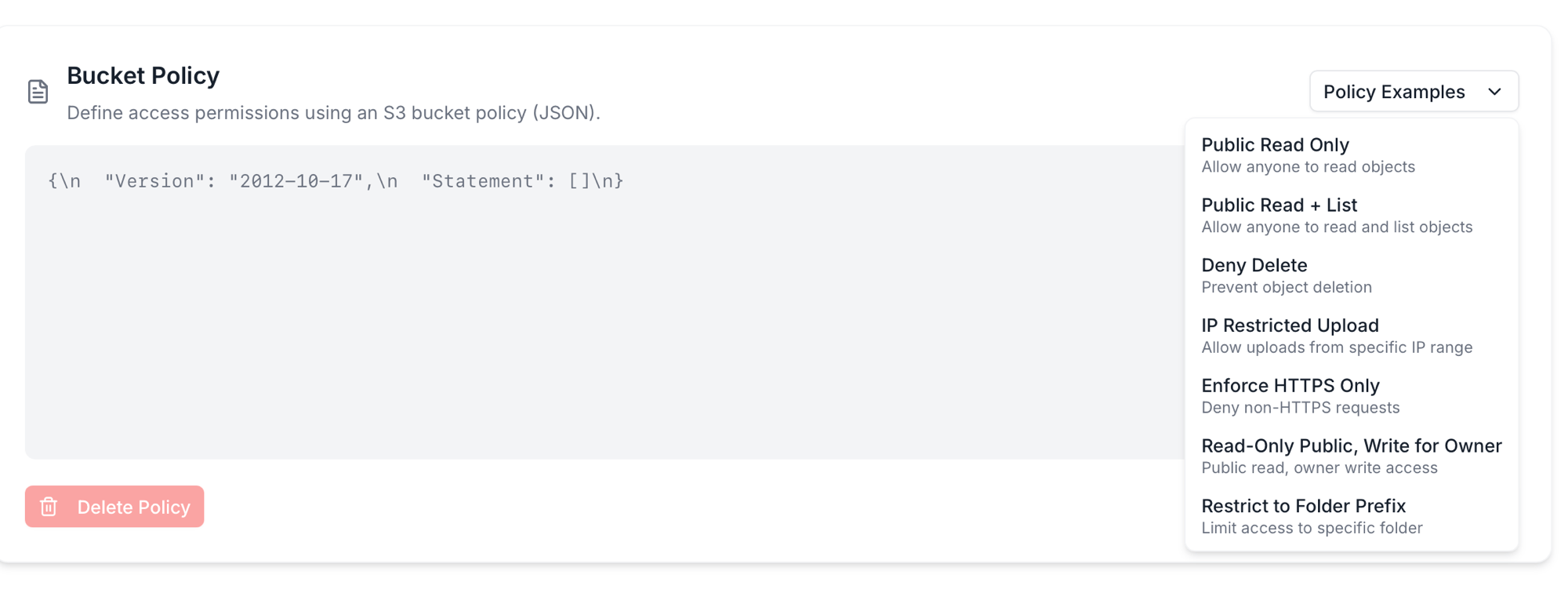 ### The seven policy templates
| Template | Use when |
| ------------------------------------- | -------------------------------------------------------------------------------------------------------------------- |
| **Public Read Only** | Bucket-wide unauthenticated download access — equivalent to ACL `Public Read` but expressed as a policy you can edit |
| **Public Read + List** | Same as above, plus `s3:ListBucket` so visitors can browse the object listing |
| **Deny Delete** | Lock down `s3:DeleteObject` and `s3:DeleteObjectVersion` for everyone — useful for compliance / audit logs |
| **IP Restricted Upload** | Only allow `s3:PutObject` from a specific IP CIDR — restricts uploads to your office, CI runners, etc. |
| **Enforce HTTPS Only** | Deny any request that arrives over plain HTTP. Pair with public buckets to prevent accidental cleartext traffic |
| **Read-Only Public, Write for Owner** | The "static site" pattern — anyone can GET, only credentialed accounts can PUT/DELETE |
| **Restrict to Folder Prefix** | Limit access to objects under a specific key prefix (e.g. `public/` is readable, `private/` isn't) |
Pick a template, the editor fills in working JSON, you tweak (add your IP, your folder name, etc.), then **Save Policy**.
To remove a policy entirely, **Delete Policy** clears the document; access falls back to the bucket's ACL alone.
### What each template looks like as JSON
If you'd rather paste a template into your own infrastructure-as-code or write your own, here's the JSON each one produces. Replace `BUCKET_NAME` with your actual bucket name; replace IP / prefix placeholders where called out.
#### Public Read Only
```json theme={null}
{
"Version": "2012-10-17",
"Statement": [
{
"Effect": "Allow",
"Principal": "*",
"Action": "s3:GetObject",
"Resource": "arn:aws:s3:::BUCKET_NAME/*"
}
]
}
```
#### Public Read + List
```json theme={null}
{
"Version": "2012-10-17",
"Statement": [
{
"Effect": "Allow",
"Principal": "*",
"Action": ["s3:GetObject", "s3:ListBucket"],
"Resource": [
"arn:aws:s3:::BUCKET_NAME",
"arn:aws:s3:::BUCKET_NAME/*"
]
}
]
}
```
#### Deny Delete
```json theme={null}
{
"Version": "2012-10-17",
"Statement": [
{
"Effect": "Deny",
"Principal": "*",
"Action": ["s3:DeleteObject", "s3:DeleteObjectVersion"],
"Resource": "arn:aws:s3:::BUCKET_NAME/*"
}
]
}
```
#### IP Restricted Upload
Replace `192.168.1.0/24` with your office or CI runner CIDR.
```json theme={null}
{
"Version": "2012-10-17",
"Statement": [
{
"Effect": "Allow",
"Principal": "*",
"Action": "s3:PutObject",
"Resource": "arn:aws:s3:::BUCKET_NAME/*",
"Condition": {
"IpAddress": {
"aws:SourceIp": "192.168.1.0/24"
}
}
}
]
}
```
#### Enforce HTTPS Only
```json theme={null}
{
"Version": "2012-10-17",
"Statement": [
{
"Effect": "Deny",
"Principal": "*",
"Action": "s3:*",
"Resource": [
"arn:aws:s3:::BUCKET_NAME",
"arn:aws:s3:::BUCKET_NAME/*"
],
"Condition": {
"Bool": {
"aws:SecureTransport": "false"
}
}
}
]
}
```
Pair with one of the public-read templates for a public bucket that rejects cleartext traffic — combine the two `Statement` arrays in one policy.
#### Read-Only Public, Write for Owner
```json theme={null}
{
"Version": "2012-10-17",
"Statement": [
{
"Effect": "Allow",
"Principal": "*",
"Action": "s3:GetObject",
"Resource": "arn:aws:s3:::BUCKET_NAME/*"
},
{
"Effect": "Allow",
"Principal": {
"AWS": "arn:aws:iam::ACCOUNT_ID:root"
},
"Action": ["s3:PutObject", "s3:DeleteObject"],
"Resource": "arn:aws:s3:::BUCKET_NAME/*"
}
]
}
```
The "static site" pattern — anyone can GET, only your account can PUT/DELETE.
#### Restrict to Folder Prefix
Replace `uploads/` with your actual prefix.
```json theme={null}
{
"Version": "2012-10-17",
"Statement": [
{
"Effect": "Allow",
"Principal": "*",
"Action": ["s3:GetObject", "s3:PutObject", "s3:DeleteObject"],
"Resource": "arn:aws:s3:::BUCKET_NAME/uploads/*"
}
]
}
```
Limits the public access to one folder. Other prefixes (`private/`, `internal/`) remain inaccessible without credentials.
### How policies and ACLs interact
When both are set, S3 evaluates **bucket policy + bucket ACL + object ACL** and grants access if **any of them allows it** — except for explicit `Deny` statements in a bucket policy, which override allows.
Practical implications:
* **Adding a `Public Read` policy** on top of a `Private` ACL → bucket is effectively public. The policy grants what the ACL doesn't.
* **Adding a `Deny Delete` policy** on top of any ACL → no one can delete, even the owner via console (use `Delete Policy` first if you need to clean up).
* **`Enforce HTTPS Only`** is a hard filter — it doesn't grant access, it blocks plain-HTTP requests entirely. Always safe to layer on.
If two layers conflict, the `Deny` wins. Use `Deny` carefully.
## Object-level ACL — overriding for one file
Each object can carry its own ACL that opens it up even when the bucket is private. Open the object's **Details** page from the bucket's Objects tab → row Actions → **Details**.
### The seven policy templates
| Template | Use when |
| ------------------------------------- | -------------------------------------------------------------------------------------------------------------------- |
| **Public Read Only** | Bucket-wide unauthenticated download access — equivalent to ACL `Public Read` but expressed as a policy you can edit |
| **Public Read + List** | Same as above, plus `s3:ListBucket` so visitors can browse the object listing |
| **Deny Delete** | Lock down `s3:DeleteObject` and `s3:DeleteObjectVersion` for everyone — useful for compliance / audit logs |
| **IP Restricted Upload** | Only allow `s3:PutObject` from a specific IP CIDR — restricts uploads to your office, CI runners, etc. |
| **Enforce HTTPS Only** | Deny any request that arrives over plain HTTP. Pair with public buckets to prevent accidental cleartext traffic |
| **Read-Only Public, Write for Owner** | The "static site" pattern — anyone can GET, only credentialed accounts can PUT/DELETE |
| **Restrict to Folder Prefix** | Limit access to objects under a specific key prefix (e.g. `public/` is readable, `private/` isn't) |
Pick a template, the editor fills in working JSON, you tweak (add your IP, your folder name, etc.), then **Save Policy**.
To remove a policy entirely, **Delete Policy** clears the document; access falls back to the bucket's ACL alone.
### What each template looks like as JSON
If you'd rather paste a template into your own infrastructure-as-code or write your own, here's the JSON each one produces. Replace `BUCKET_NAME` with your actual bucket name; replace IP / prefix placeholders where called out.
#### Public Read Only
```json theme={null}
{
"Version": "2012-10-17",
"Statement": [
{
"Effect": "Allow",
"Principal": "*",
"Action": "s3:GetObject",
"Resource": "arn:aws:s3:::BUCKET_NAME/*"
}
]
}
```
#### Public Read + List
```json theme={null}
{
"Version": "2012-10-17",
"Statement": [
{
"Effect": "Allow",
"Principal": "*",
"Action": ["s3:GetObject", "s3:ListBucket"],
"Resource": [
"arn:aws:s3:::BUCKET_NAME",
"arn:aws:s3:::BUCKET_NAME/*"
]
}
]
}
```
#### Deny Delete
```json theme={null}
{
"Version": "2012-10-17",
"Statement": [
{
"Effect": "Deny",
"Principal": "*",
"Action": ["s3:DeleteObject", "s3:DeleteObjectVersion"],
"Resource": "arn:aws:s3:::BUCKET_NAME/*"
}
]
}
```
#### IP Restricted Upload
Replace `192.168.1.0/24` with your office or CI runner CIDR.
```json theme={null}
{
"Version": "2012-10-17",
"Statement": [
{
"Effect": "Allow",
"Principal": "*",
"Action": "s3:PutObject",
"Resource": "arn:aws:s3:::BUCKET_NAME/*",
"Condition": {
"IpAddress": {
"aws:SourceIp": "192.168.1.0/24"
}
}
}
]
}
```
#### Enforce HTTPS Only
```json theme={null}
{
"Version": "2012-10-17",
"Statement": [
{
"Effect": "Deny",
"Principal": "*",
"Action": "s3:*",
"Resource": [
"arn:aws:s3:::BUCKET_NAME",
"arn:aws:s3:::BUCKET_NAME/*"
],
"Condition": {
"Bool": {
"aws:SecureTransport": "false"
}
}
}
]
}
```
Pair with one of the public-read templates for a public bucket that rejects cleartext traffic — combine the two `Statement` arrays in one policy.
#### Read-Only Public, Write for Owner
```json theme={null}
{
"Version": "2012-10-17",
"Statement": [
{
"Effect": "Allow",
"Principal": "*",
"Action": "s3:GetObject",
"Resource": "arn:aws:s3:::BUCKET_NAME/*"
},
{
"Effect": "Allow",
"Principal": {
"AWS": "arn:aws:iam::ACCOUNT_ID:root"
},
"Action": ["s3:PutObject", "s3:DeleteObject"],
"Resource": "arn:aws:s3:::BUCKET_NAME/*"
}
]
}
```
The "static site" pattern — anyone can GET, only your account can PUT/DELETE.
#### Restrict to Folder Prefix
Replace `uploads/` with your actual prefix.
```json theme={null}
{
"Version": "2012-10-17",
"Statement": [
{
"Effect": "Allow",
"Principal": "*",
"Action": ["s3:GetObject", "s3:PutObject", "s3:DeleteObject"],
"Resource": "arn:aws:s3:::BUCKET_NAME/uploads/*"
}
]
}
```
Limits the public access to one folder. Other prefixes (`private/`, `internal/`) remain inaccessible without credentials.
### How policies and ACLs interact
When both are set, S3 evaluates **bucket policy + bucket ACL + object ACL** and grants access if **any of them allows it** — except for explicit `Deny` statements in a bucket policy, which override allows.
Practical implications:
* **Adding a `Public Read` policy** on top of a `Private` ACL → bucket is effectively public. The policy grants what the ACL doesn't.
* **Adding a `Deny Delete` policy** on top of any ACL → no one can delete, even the owner via console (use `Delete Policy` first if you need to clean up).
* **`Enforce HTTPS Only`** is a hard filter — it doesn't grant access, it blocks plain-HTTP requests entirely. Always safe to layer on.
If two layers conflict, the `Deny` wins. Use `Deny` carefully.
## Object-level ACL — overriding for one file
Each object can carry its own ACL that opens it up even when the bucket is private. Open the object's **Details** page from the bucket's Objects tab → row Actions → **Details**.
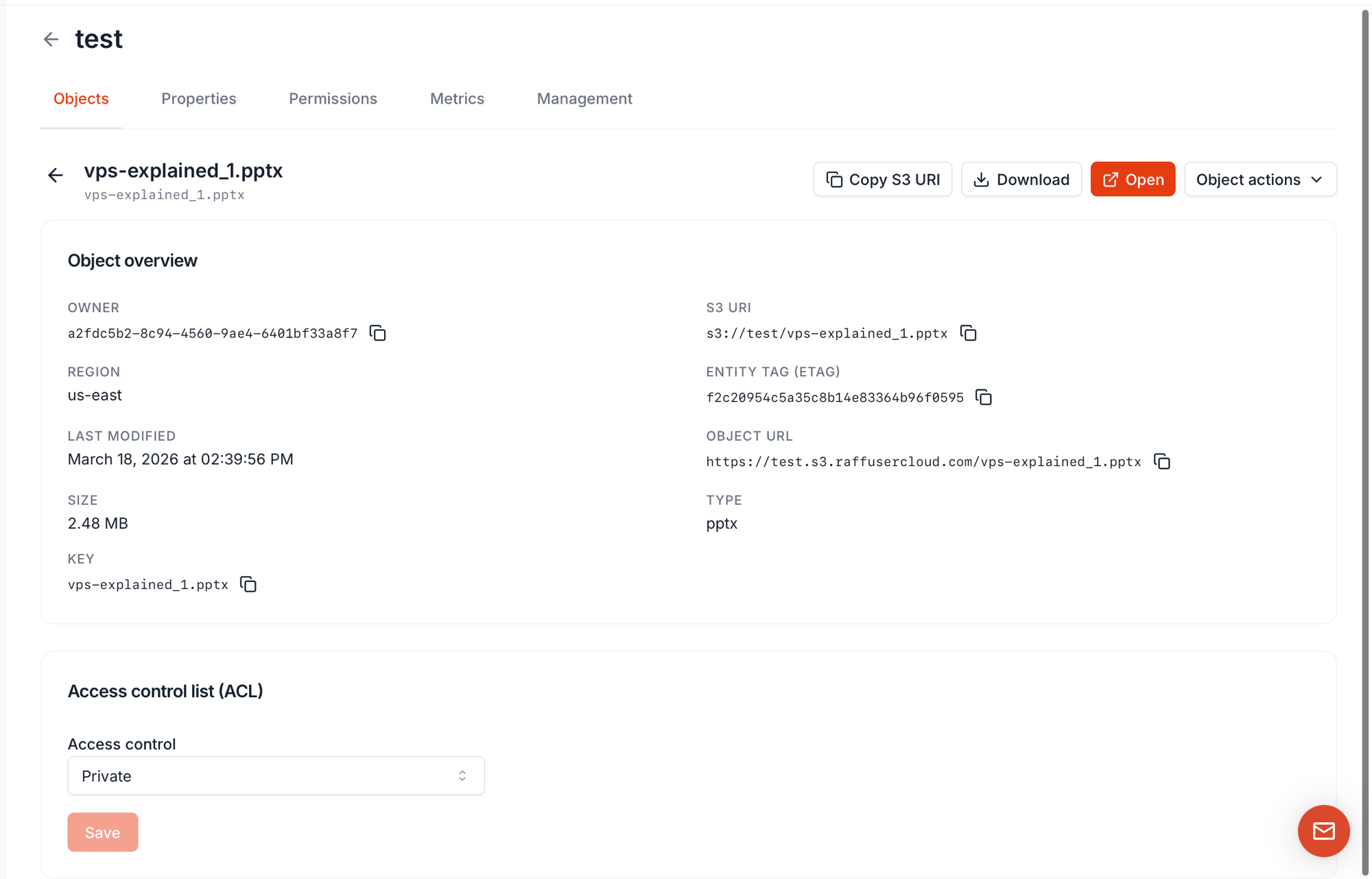 The **Object overview** card gives you what you need to share or reference the object:
| Field | Use as |
| -------------------------------------------------------------- | ------------------------------------------------------------------------- |
| **S3 URI** (`s3:///`) | Canonical reference for SDKs and CLIs |
| **Object URL** (`https://.s3.raffusercloud.com/`) | HTTP endpoint — only works in a browser if the object is public |
| **ETag** | Server's hash of the contents — for cache validation and integrity checks |
| **Key** | The object's name including any folder prefix |
At the bottom, the **Access control list (ACL)** dropdown sets per-object ACL: `Private` or `Public`. Save and the change applies immediately.
**The recommended pattern** for an "almost-private" bucket: keep the bucket **Private**, then flip individual objects to **Public** only when needed. This is far safer than flipping the bucket public and trying to lock individual files back down.
## Presigned URLs — the fourth option
Sometimes you want to share **one file with one person without flipping any ACL**. The dashboard's per-object **Share** action (and the SDK's `generate_presigned_url` / `GetObjectPresign` calls) generates a **presigned URL** — a long, time-limited HTTPS link that lets anyone download the object without credentials, until it expires.
| Property | Value |
| -------------------- | -------------------------------------------------------------------------------------------------------- |
| Object visibility | Object stays **private** — no ACL change |
| Who can use the URL | Anyone holding it — no Raff account needed |
| Valid for | Time-limited (minutes to hours; configurable when the URL is generated) |
| Revocable mid-flight | No — valid until expiry. To revoke faster, rotate the access key that signed it |
| Best for | One-off sharing, email download links, third-party data drops, signed download tokens served by your app |
Use a presigned URL when:
* The file should not be permanently public
* The recipient doesn't have Raff access
* The link should self-expire — no cleanup required
Use a public ACL or policy when:
* The file is permanently public (static assets, public docs)
* The link needs to work without expiring
* You're building a CDN origin
## Combination matrix
How the layers stack:
| Bucket ACL | Bucket Policy | Object ACL | Result |
| ----------- | -------------------- | ---------- | ---------------------------------------------------------------------------------------------------------------------------------------------------------- |
| Private | (none) | Private | Authenticated only — Object URL returns 403 in a browser; SDK with valid keys works |
| Private | (none) | Public | This object readable; the rest of the bucket private |
| Private | `Public Read Only` | Private | Whole bucket effectively public — policy grants what ACL doesn't |
| Public Read | (none) | Private | Object-level "Private" inside a public bucket is **not reliable** — bucket grant wins on most paths. Don't depend on object-private inside a public bucket |
| Public Read | `Deny Delete` | (any) | Public for read; nobody (even owner) can delete via this code path until policy is cleared |
| (any) | `Enforce HTTPS Only` | (any) | Plain HTTP requests blocked at the policy layer regardless of other grants |
When in doubt, **read all three layers** before reasoning about who can access what.
## New uploads — what ACL do they get?
Default behavior when you upload a new object:
| Bucket ACL | New object's default ACL |
| ----------- | ------------------------ |
| Private | Private |
| Public Read | Public Read |
Override at upload time via the SDK with `PutObject(ACL: ...)`. The dashboard upload always uses the bucket default — no per-upload picker today.
## Common gotchas
* **Periods in bucket names break HTTPS for public buckets.** The wildcard cert covers `*.s3.raffusercloud.com`, not nested dots like `bucket.with.dots.s3.raffusercloud.com`. Use hyphens for public bucket names.
* **`Open` on the dashboard fails for private objects.** That action uses the Object URL, which needs public access. Use **Download** or **Share** instead.
* **Switching a public bucket back to private doesn't kill existing presigned URLs.** They keep working until they expire. Rotate the signing access key if you need to revoke faster.
* **`Deny` in a bucket policy locks the owner out too.** A `Deny Delete` you forgot will block your own cleanup until you `Delete Policy` from the dashboard.
* **Public buckets leak silently.** There's no daily report telling you a bucket is public — once it's public, it's public. Periodically audit the **ACL** column on the Buckets list.
## Next steps
S3 credentials with Full or Limited (per-bucket) scope.
Programmatic ACL changes and presigned URLs.
Which AWS S3 features work and which don't.
The **Object overview** card gives you what you need to share or reference the object:
| Field | Use as |
| -------------------------------------------------------------- | ------------------------------------------------------------------------- |
| **S3 URI** (`s3:///`) | Canonical reference for SDKs and CLIs |
| **Object URL** (`https://.s3.raffusercloud.com/`) | HTTP endpoint — only works in a browser if the object is public |
| **ETag** | Server's hash of the contents — for cache validation and integrity checks |
| **Key** | The object's name including any folder prefix |
At the bottom, the **Access control list (ACL)** dropdown sets per-object ACL: `Private` or `Public`. Save and the change applies immediately.
**The recommended pattern** for an "almost-private" bucket: keep the bucket **Private**, then flip individual objects to **Public** only when needed. This is far safer than flipping the bucket public and trying to lock individual files back down.
## Presigned URLs — the fourth option
Sometimes you want to share **one file with one person without flipping any ACL**. The dashboard's per-object **Share** action (and the SDK's `generate_presigned_url` / `GetObjectPresign` calls) generates a **presigned URL** — a long, time-limited HTTPS link that lets anyone download the object without credentials, until it expires.
| Property | Value |
| -------------------- | -------------------------------------------------------------------------------------------------------- |
| Object visibility | Object stays **private** — no ACL change |
| Who can use the URL | Anyone holding it — no Raff account needed |
| Valid for | Time-limited (minutes to hours; configurable when the URL is generated) |
| Revocable mid-flight | No — valid until expiry. To revoke faster, rotate the access key that signed it |
| Best for | One-off sharing, email download links, third-party data drops, signed download tokens served by your app |
Use a presigned URL when:
* The file should not be permanently public
* The recipient doesn't have Raff access
* The link should self-expire — no cleanup required
Use a public ACL or policy when:
* The file is permanently public (static assets, public docs)
* The link needs to work without expiring
* You're building a CDN origin
## Combination matrix
How the layers stack:
| Bucket ACL | Bucket Policy | Object ACL | Result |
| ----------- | -------------------- | ---------- | ---------------------------------------------------------------------------------------------------------------------------------------------------------- |
| Private | (none) | Private | Authenticated only — Object URL returns 403 in a browser; SDK with valid keys works |
| Private | (none) | Public | This object readable; the rest of the bucket private |
| Private | `Public Read Only` | Private | Whole bucket effectively public — policy grants what ACL doesn't |
| Public Read | (none) | Private | Object-level "Private" inside a public bucket is **not reliable** — bucket grant wins on most paths. Don't depend on object-private inside a public bucket |
| Public Read | `Deny Delete` | (any) | Public for read; nobody (even owner) can delete via this code path until policy is cleared |
| (any) | `Enforce HTTPS Only` | (any) | Plain HTTP requests blocked at the policy layer regardless of other grants |
When in doubt, **read all three layers** before reasoning about who can access what.
## New uploads — what ACL do they get?
Default behavior when you upload a new object:
| Bucket ACL | New object's default ACL |
| ----------- | ------------------------ |
| Private | Private |
| Public Read | Public Read |
Override at upload time via the SDK with `PutObject(ACL: ...)`. The dashboard upload always uses the bucket default — no per-upload picker today.
## Common gotchas
* **Periods in bucket names break HTTPS for public buckets.** The wildcard cert covers `*.s3.raffusercloud.com`, not nested dots like `bucket.with.dots.s3.raffusercloud.com`. Use hyphens for public bucket names.
* **`Open` on the dashboard fails for private objects.** That action uses the Object URL, which needs public access. Use **Download** or **Share** instead.
* **Switching a public bucket back to private doesn't kill existing presigned URLs.** They keep working until they expire. Rotate the signing access key if you need to revoke faster.
* **`Deny` in a bucket policy locks the owner out too.** A `Deny Delete` you forgot will block your own cleanup until you `Delete Policy` from the dashboard.
* **Public buckets leak silently.** There's no daily report telling you a bucket is public — once it's public, it's public. Periodically audit the **ACL** column on the Buckets list.
## Next steps
S3 credentials with Full or Limited (per-bucket) scope.
Programmatic ACL changes and presigned URLs.
Which AWS S3 features work and which don't.