
Documentation Index

Fetch the complete documentation index at: https://docs.rafftechnologies.com/llms.txt

Use this file to discover all available pages before exploring further.

Updated May 8, 2026 Raff Object Storage controls access at three levels, and they combine. Default everything to private. Only flip something public when the data’s whole purpose is to be served to unauthenticated readers — and even then, prefer a per-object public override on a private bucket.

The three layers

LayerWhereScopeBest for
Bucket ACLPermissions tab → Change ACLWhole bucket — every object inheritsBuckets that exist to serve public content (static sites, public assets)
Bucket PolicyPermissions tab → Bucket PolicyWhole bucket — flexible JSON-based rulesConditional access (IP-restricted, HTTPS-only, deny-delete, folder-scoped)
Object ACLObject detail page → Access controlSingle objectSharing one file from an otherwise private bucket
Layered access is most permissive — if any layer grants read, the read succeeds. Public bucket + private object usually still ends up public; private bucket + public object exposes that one object only. A fourth option — presigned URLs — sits outside this model and is covered at the bottom.

Open the Permissions tab

All bucket-level access controls live on the bucket detail page’s Permissions tab.
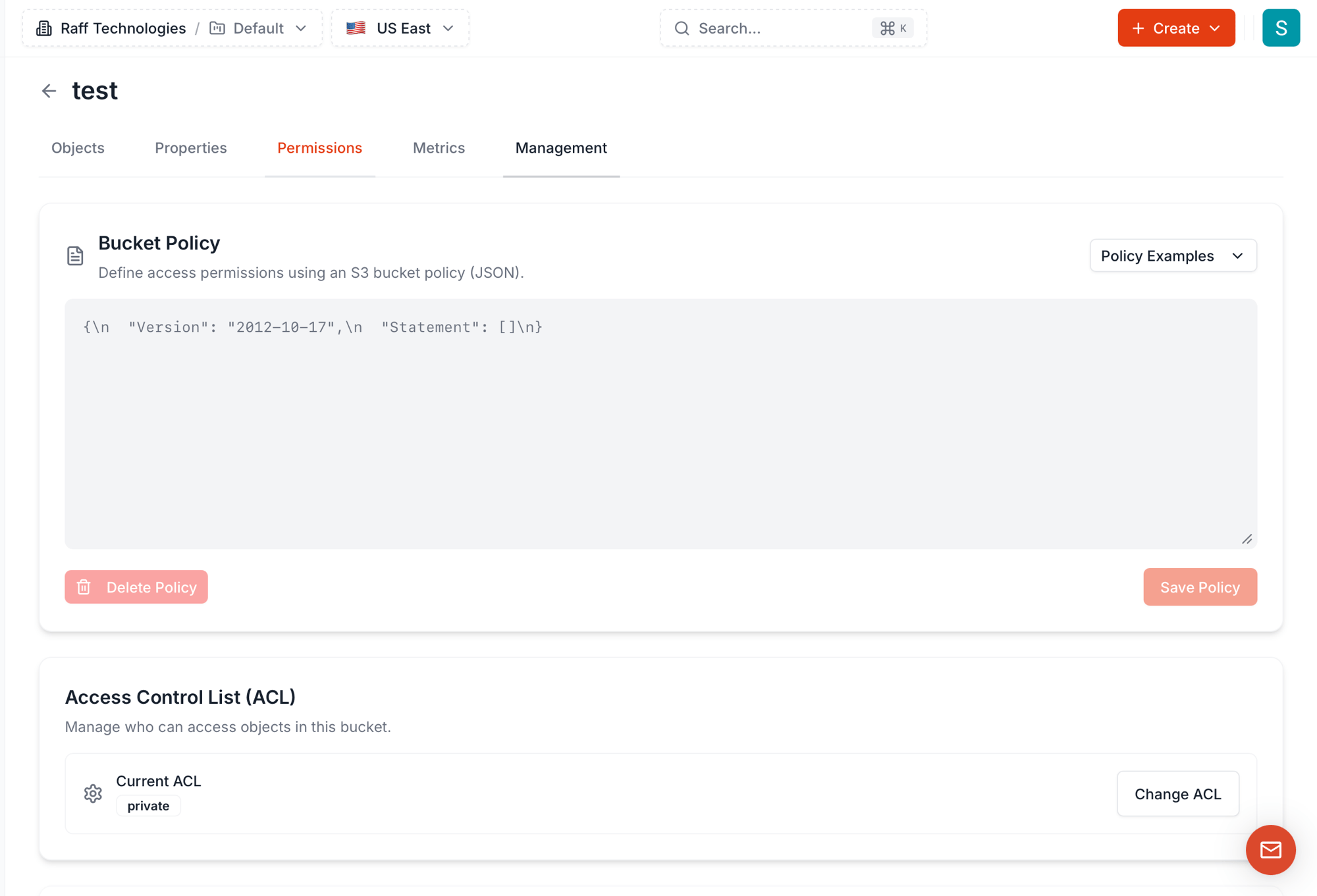
Bucket Permissions tab showing the Bucket Policy JSON editor with empty default policy and Policy Examples dropdown, plus the Access Control List section with current ACL "private" and a Change ACL button
The tab has two sections:
  • Bucket Policy — JSON-based access rules with 7 ready-to-use templates
  • Access Control List (ACL) — coarse-grained bucket-wide permission level, four options

Bucket ACL — the four options

Click Change ACL to open the picker.
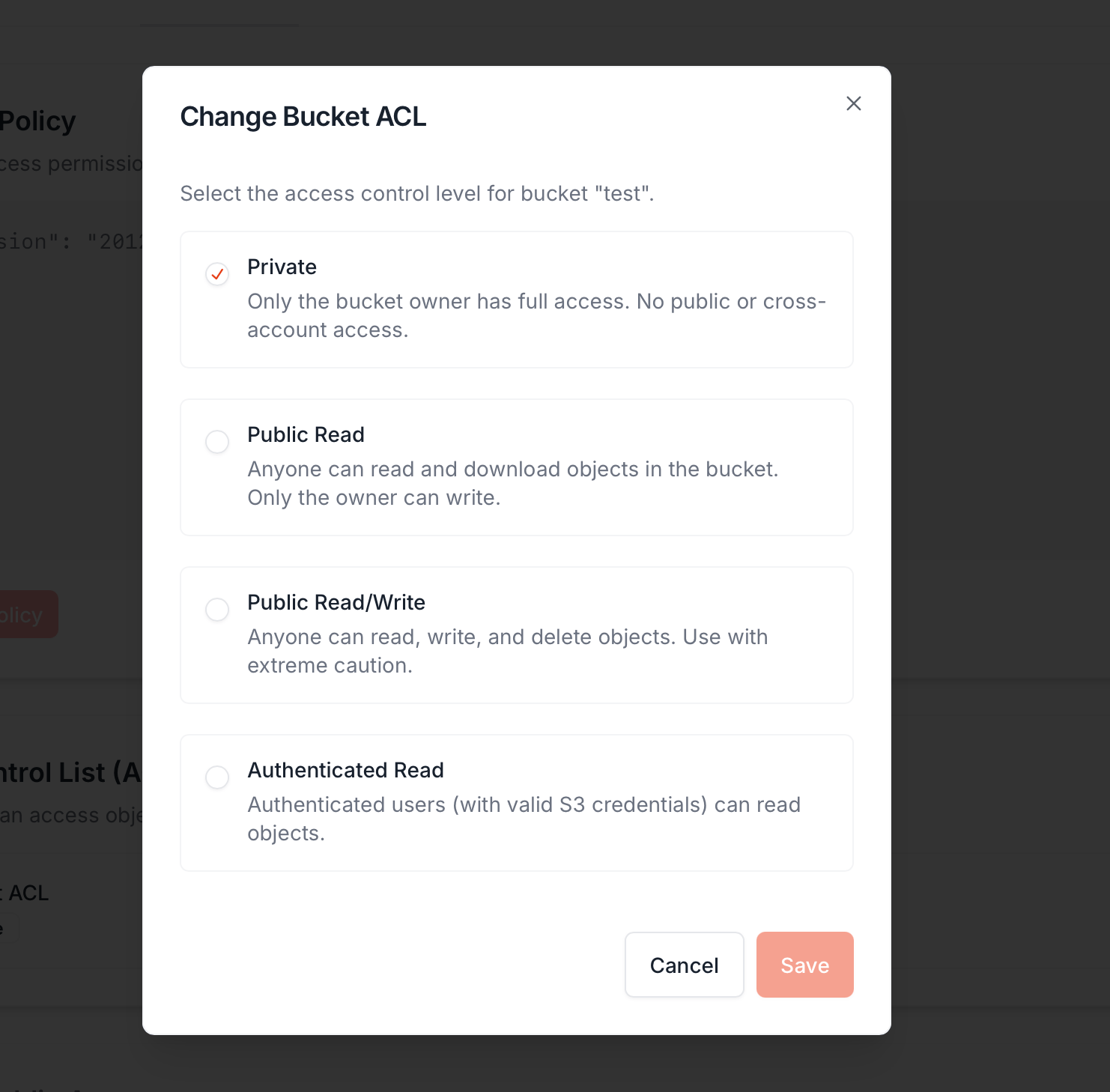
Change Bucket ACL dialog with 4 options: Private (selected), Public Read, Public Read/Write, Authenticated Read
ACLWhat it doesWhen to use
Private (default)Only the bucket owner has full access. No public or cross-account read or write.Default — anything that isn’t a public asset bucket
Public ReadAnyone can read and download objects via their Object URL. Only the owner can write.Static site hosting, public CDN origin, public download distribution
Public Read/WriteAnyone can read, write, and delete. Use with extreme caution.Almost never. Anonymous bug-bounty drop boxes, intentional one-shot fileshares — and even then, probably not
Authenticated ReadAnyone with valid S3 credentials (any Raff account, any AWS account) can read.Multi-tenant collaboration without making data fully public
Bucket-level ACL is bucket-wide. If you flip a bucket to Public Read, every object in it becomes publicly readable — current and future — unless that object has an explicit private override at the object level. Customer uploads, internal logs, anything you missed: all of it goes live.We do not recommend public ACL on a bucket unless the bucket’s entire purpose is public hosting. The safer pattern is to keep the bucket Private and override only the specific objects that need to be public on the object detail page.

Bucket Policy — the JSON rules

The Bucket Policy section accepts an S3-style JSON policy document. It lets you express things ACLs can’t:
  • “Allow uploads only from these IP ranges”
  • “Deny all delete operations on this bucket”
  • “Force HTTPS — block plain HTTP requests”
  • “Public for read, but only the owner can write”
  • “Limit access to objects under one folder prefix”
The default empty policy is {"Version": "2012-10-17", "Statement": []} — no rules. Add statements directly, or pick a template from the Policy Examples dropdown:
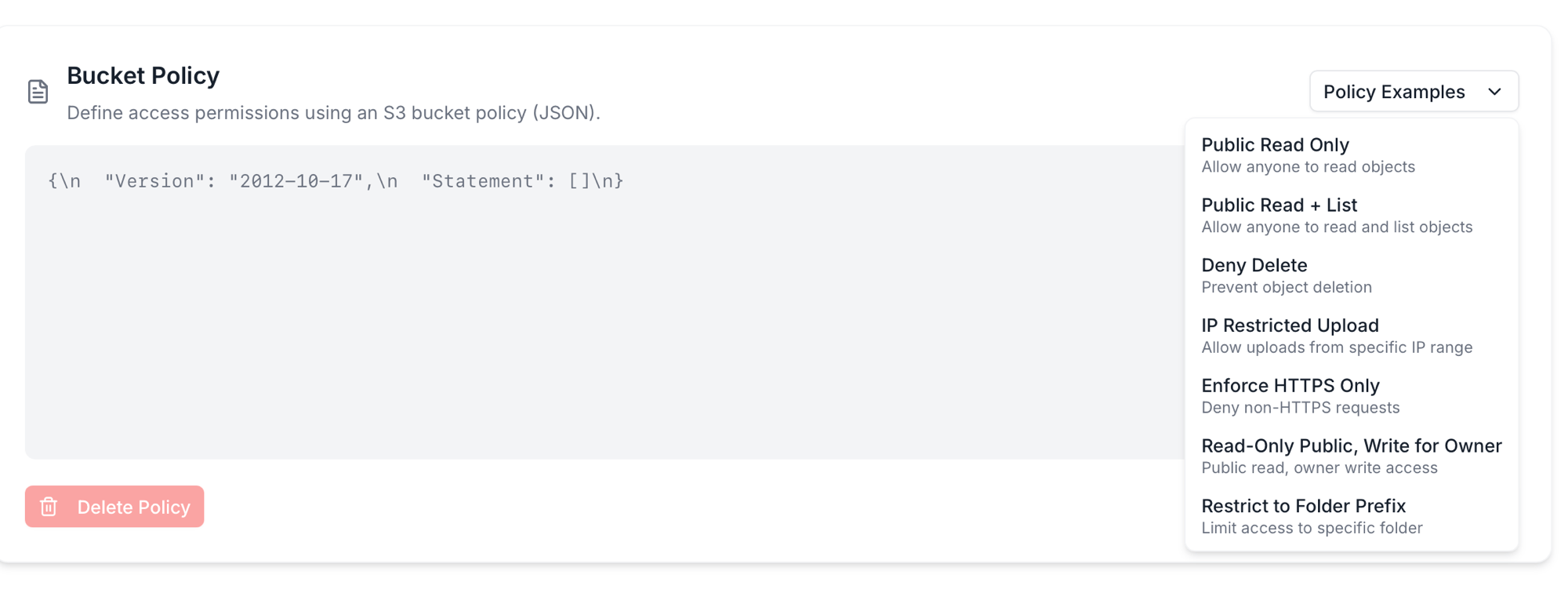
Policy Examples dropdown showing seven options: Public Read Only, Public Read + List, Deny Delete, IP Restricted Upload, Enforce HTTPS Only, Read-Only Public Write for Owner, Restrict to Folder Prefix

The seven policy templates

TemplateUse when
Public Read OnlyBucket-wide unauthenticated download access — equivalent to ACL Public Read but expressed as a policy you can edit
Public Read + ListSame as above, plus s3:ListBucket so visitors can browse the object listing
Deny DeleteLock down s3:DeleteObject and s3:DeleteObjectVersion for everyone — useful for compliance / audit logs
IP Restricted UploadOnly allow s3:PutObject from a specific IP CIDR — restricts uploads to your office, CI runners, etc.
Enforce HTTPS OnlyDeny any request that arrives over plain HTTP. Pair with public buckets to prevent accidental cleartext traffic
Read-Only Public, Write for OwnerThe “static site” pattern — anyone can GET, only credentialed accounts can PUT/DELETE
Restrict to Folder PrefixLimit access to objects under a specific key prefix (e.g. public/ is readable, private/ isn’t)
Pick a template, the editor fills in working JSON, you tweak (add your IP, your folder name, etc.), then Save Policy. To remove a policy entirely, Delete Policy clears the document; access falls back to the bucket’s ACL alone.

What each template looks like as JSON

If you’d rather paste a template into your own infrastructure-as-code or write your own, here’s the JSON each one produces. Replace BUCKET_NAME with your actual bucket name; replace IP / prefix placeholders where called out.

Public Read Only

{
  "Version": "2012-10-17",
  "Statement": [
    {
      "Effect": "Allow",
      "Principal": "*",
      "Action": "s3:GetObject",
      "Resource": "arn:aws:s3:::BUCKET_NAME/*"
    }
  ]
}

Public Read + List

{
  "Version": "2012-10-17",
  "Statement": [
    {
      "Effect": "Allow",
      "Principal": "*",
      "Action": ["s3:GetObject", "s3:ListBucket"],
      "Resource": [
        "arn:aws:s3:::BUCKET_NAME",
        "arn:aws:s3:::BUCKET_NAME/*"
      ]
    }
  ]
}

Deny Delete

{
  "Version": "2012-10-17",
  "Statement": [
    {
      "Effect": "Deny",
      "Principal": "*",
      "Action": ["s3:DeleteObject", "s3:DeleteObjectVersion"],
      "Resource": "arn:aws:s3:::BUCKET_NAME/*"
    }
  ]
}

IP Restricted Upload

Replace 192.168.1.0/24 with your office or CI runner CIDR.
{
  "Version": "2012-10-17",
  "Statement": [
    {
      "Effect": "Allow",
      "Principal": "*",
      "Action": "s3:PutObject",
      "Resource": "arn:aws:s3:::BUCKET_NAME/*",
      "Condition": {
        "IpAddress": {
          "aws:SourceIp": "192.168.1.0/24"
        }
      }
    }
  ]
}

Enforce HTTPS Only

{
  "Version": "2012-10-17",
  "Statement": [
    {
      "Effect": "Deny",
      "Principal": "*",
      "Action": "s3:*",
      "Resource": [
        "arn:aws:s3:::BUCKET_NAME",
        "arn:aws:s3:::BUCKET_NAME/*"
      ],
      "Condition": {
        "Bool": {
          "aws:SecureTransport": "false"
        }
      }
    }
  ]
}
Pair with one of the public-read templates for a public bucket that rejects cleartext traffic — combine the two Statement arrays in one policy.

Read-Only Public, Write for Owner

{
  "Version": "2012-10-17",
  "Statement": [
    {
      "Effect": "Allow",
      "Principal": "*",
      "Action": "s3:GetObject",
      "Resource": "arn:aws:s3:::BUCKET_NAME/*"
    },
    {
      "Effect": "Allow",
      "Principal": {
        "AWS": "arn:aws:iam::ACCOUNT_ID:root"
      },
      "Action": ["s3:PutObject", "s3:DeleteObject"],
      "Resource": "arn:aws:s3:::BUCKET_NAME/*"
    }
  ]
}
The “static site” pattern — anyone can GET, only your account can PUT/DELETE.

Restrict to Folder Prefix

Replace uploads/ with your actual prefix.
{
  "Version": "2012-10-17",
  "Statement": [
    {
      "Effect": "Allow",
      "Principal": "*",
      "Action": ["s3:GetObject", "s3:PutObject", "s3:DeleteObject"],
      "Resource": "arn:aws:s3:::BUCKET_NAME/uploads/*"
    }
  ]
}
Limits the public access to one folder. Other prefixes (private/, internal/) remain inaccessible without credentials.

How policies and ACLs interact

When both are set, S3 evaluates bucket policy + bucket ACL + object ACL and grants access if any of them allows it — except for explicit Deny statements in a bucket policy, which override allows. Practical implications:
  • Adding a Public Read policy on top of a Private ACL → bucket is effectively public. The policy grants what the ACL doesn’t.
  • Adding a Deny Delete policy on top of any ACL → no one can delete, even the owner via console (use Delete Policy first if you need to clean up).
  • Enforce HTTPS Only is a hard filter — it doesn’t grant access, it blocks plain-HTTP requests entirely. Always safe to layer on.
If two layers conflict, the Deny wins. Use Deny carefully.

Object-level ACL — overriding for one file

Each object can carry its own ACL that opens it up even when the bucket is private. Open the object’s Details page from the bucket’s Objects tab → row Actions → Details.
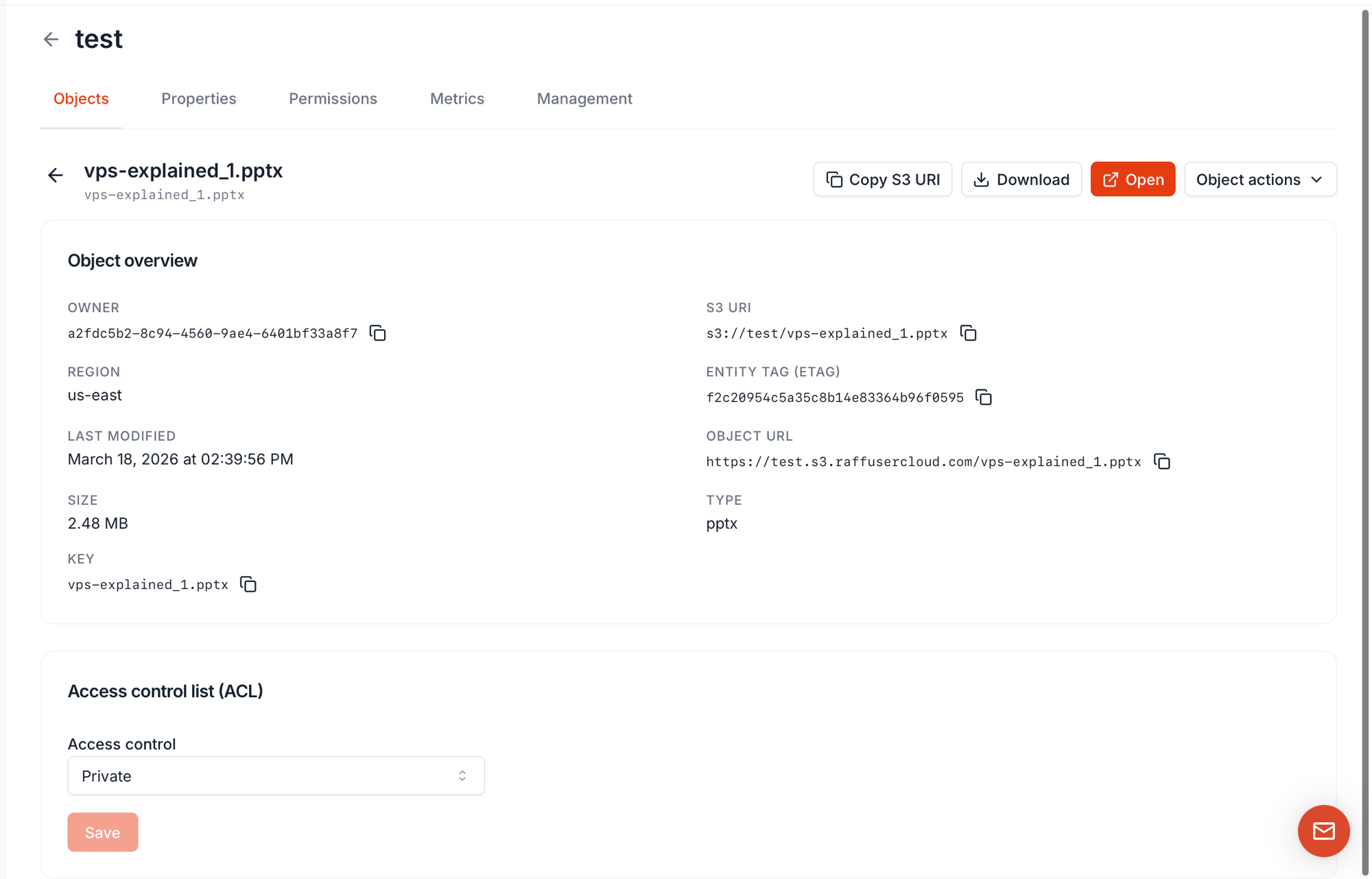
Object detail page with Object overview (owner, region, last modified, S3 URI, ETag, Object URL, key, type, size) and Access control list (ACL) at the bottom with a Private dropdown and Save button
The Object overview card gives you what you need to share or reference the object:
FieldUse as
S3 URI (s3://<bucket>/<key>)Canonical reference for SDKs and CLIs
Object URL (https://<bucket>.s3.raffusercloud.com/<key>)HTTP endpoint — only works in a browser if the object is public
ETagServer’s hash of the contents — for cache validation and integrity checks
KeyThe object’s name including any folder prefix
At the bottom, the Access control list (ACL) dropdown sets per-object ACL: Private or Public. Save and the change applies immediately. The recommended pattern for an “almost-private” bucket: keep the bucket Private, then flip individual objects to Public only when needed. This is far safer than flipping the bucket public and trying to lock individual files back down.

Presigned URLs — the fourth option

Sometimes you want to share one file with one person without flipping any ACL. The dashboard’s per-object Share action (and the SDK’s generate_presigned_url / GetObjectPresign calls) generates a presigned URL — a long, time-limited HTTPS link that lets anyone download the object without credentials, until it expires.
PropertyValue
Object visibilityObject stays private — no ACL change
Who can use the URLAnyone holding it — no Raff account needed
Valid forTime-limited (minutes to hours; configurable when the URL is generated)
Revocable mid-flightNo — valid until expiry. To revoke faster, rotate the access key that signed it
Best forOne-off sharing, email download links, third-party data drops, signed download tokens served by your app
Use a presigned URL when:
  • The file should not be permanently public
  • The recipient doesn’t have Raff access
  • The link should self-expire — no cleanup required
Use a public ACL or policy when:
  • The file is permanently public (static assets, public docs)
  • The link needs to work without expiring
  • You’re building a CDN origin

Combination matrix

How the layers stack:
Bucket ACLBucket PolicyObject ACLResult
Private(none)PrivateAuthenticated only — Object URL returns 403 in a browser; SDK with valid keys works
Private(none)PublicThis object readable; the rest of the bucket private
PrivatePublic Read OnlyPrivateWhole bucket effectively public — policy grants what ACL doesn’t
Public Read(none)PrivateObject-level “Private” inside a public bucket is not reliable — bucket grant wins on most paths. Don’t depend on object-private inside a public bucket
Public ReadDeny Delete(any)Public for read; nobody (even owner) can delete via this code path until policy is cleared
(any)Enforce HTTPS Only(any)Plain HTTP requests blocked at the policy layer regardless of other grants
When in doubt, read all three layers before reasoning about who can access what.

New uploads — what ACL do they get?

Default behavior when you upload a new object:
Bucket ACLNew object’s default ACL
PrivatePrivate
Public ReadPublic Read
Override at upload time via the SDK with PutObject(ACL: ...). The dashboard upload always uses the bucket default — no per-upload picker today.

Common gotchas

  • Periods in bucket names break HTTPS for public buckets. The wildcard cert covers *.s3.raffusercloud.com, not nested dots like bucket.with.dots.s3.raffusercloud.com. Use hyphens for public bucket names.
  • Open on the dashboard fails for private objects. That action uses the Object URL, which needs public access. Use Download or Share instead.
  • Switching a public bucket back to private doesn’t kill existing presigned URLs. They keep working until they expire. Rotate the signing access key if you need to revoke faster.
  • Deny in a bucket policy locks the owner out too. A Deny Delete you forgot will block your own cleanup until you Delete Policy from the dashboard.
  • Public buckets leak silently. There’s no daily report telling you a bucket is public — once it’s public, it’s public. Periodically audit the ACL column on the Buckets list.

Next steps

Generate access keys

S3 credentials with Full or Limited (per-bucket) scope.

Use the S3 SDK

Programmatic ACL changes and presigned URLs.

S3 compatibility

Which AWS S3 features work and which don’t.
Last modified on May 8, 2026