

The two payment containers
Money on a Raff account lives in one of two places:
You don’t have to top up the balance before using Raff — the dashboard checkout will charge the card for the full amount if your balance is $0. Balance just sits in front of the card; whatever’s there gets used first.
Supported payment methods
Raff accepts ten payment methods at checkout — seven major card networks and three digital wallets — processed through Airwallex.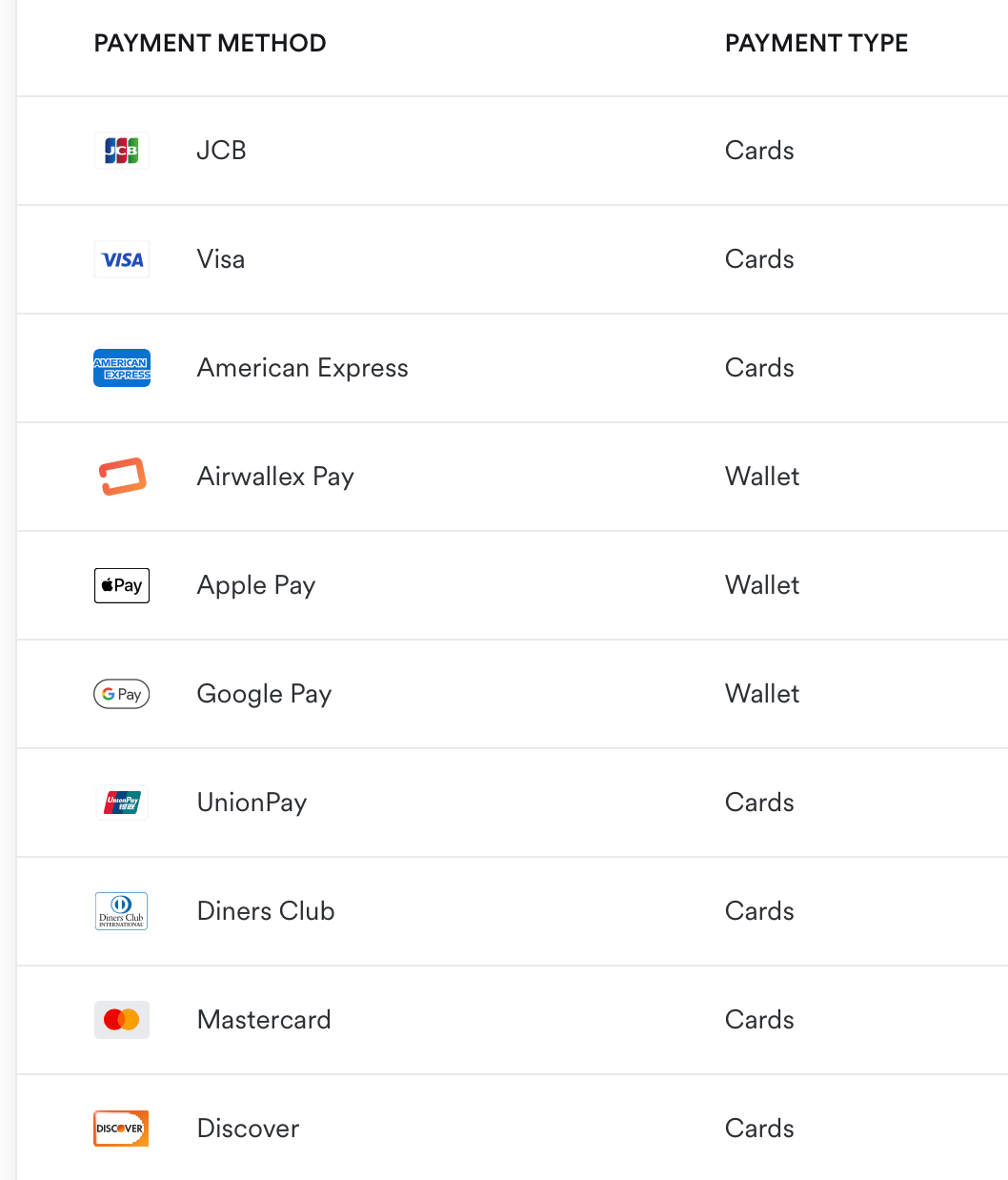
Cards are saved on file when you check out the first time and reused for renewals. Wallets work the same way — you authorize once at checkout, and the wallet is the saved-payment-method for renewals afterwards. Add, remove, or reorder methods at any time from Settings → Payment Methods.
3D Secure / SCA at checkout
When your card-issuing bank requires a step-up authentication (3D Secure 2 / SCA in Europe, equivalent rails for other regions), Airwallex’s flow surfaces the challenge inline at checkout:- You click Activate Subscription (or Top up balance)
- Airwallex routes the auth through your bank
- If the bank requires 3DS, an inline modal appears asking for the challenge — usually a one-time code from your banking app, an SMS, or a biometric prompt in your bank’s mobile app
- After you complete the challenge, the auth completes and the subscription / top-up is confirmed
- Frictionless 3DS — if your bank can authorize without challenging (low-risk transactions, well-known device + IP combo), the flow completes without showing you a modal at all. Both paths are still 3DS-authenticated; one just doesn’t ask
- Failed 3DS — if you cancel the challenge, enter the wrong code too many times, or the bank declines, checkout shows the failure with a
3DS authentication failedmessage. Try again or pick a different card - Saved cards — first checkout authenticates the card. Subsequent renewals from the same card are typically frictionless (Airwallex’s Merchant-Initiated Transaction flow handles re-auth invisibly), unless your bank specifically requires re-challenge
- Wallet-paid purchases (Apple Pay, Google Pay, Airwallex Pay) — the wallet’s own biometric is the SCA equivalent; no separate 3DS modal appears
The two billing modes
Subscription (default for new accounts)
You pay the full term up front (Monthly / Yearly / 2-Year), and the resource runs without further charges until the term ends or you change it.- Term discounts: Yearly -17%, 2 Years -17% vs Monthly.
- Stopping a VM (
passive) does not prorate or pause charges — the subscription continues for the term you paid for. - Resize-up mid-term charges the prorated difference; resize-down credits the prorated difference back to your balance.
- Delete mid-term credits all unused days and hours back to your balance.
Pay-as-you-go (PAYG, on request)
For enterprise and SMB customers who request it. Bills usage by the hour from your balance, with no advance commitment.- Hourly rate matches the equivalent monthly subscription’s per-hour cost.
- Settled at month-end on the 1st against your balance.
- No credit-on-delete — you only pay for what already ran.
The charge order at checkout
When you confirm a purchase in the dashboard, the order summary always shows three lines:
If your balance covers the subtotal, Total Due is $0 and you click Activate Subscription — no card charge. Otherwise the card form is presented, the difference is charged, and the card is saved for future renewals (removable in Settings → Payment Methods).
The 14-day money-back guarantee applies to subscription purchases made through the dashboard checkout.
Credit — the universal “refund”
When something gives you money back — delete a VM mid-term, downsize a plan, hit an SLA credit — Raff returns the value as account balance, not as a card refund.
Credits sit in your balance and apply to the next purchase, renewal, or top-up. They don’t go back to the original payment method. They are not refunded to your card.
This is why “refund” is the wrong mental model — it’s “credit forward.”
Billing date rotation to the 1st
By default, every Raff account’s billing rotates to the 1st of the month within two cycles. This happens automatically with no setting to toggle.
The month-2 prorated charge is always smaller than a full month — it covers only the gap. After the single correction, every VM, volume, snapshot, backup, and Public IP renews on the 1st with clear per-resource line items. They share an invoice; they don’t merge into a lump sum.
See Pricing → Billing-date alignment for the worked example.
What’s metered vs unlimited
The Total Data Transfer graph in the dashboard tracks outbound for visibility — not for billing. There’s nothing to bill against.
Failure modes
When a paid action fails for billing reasons via the API, the response is one of:
Through the dashboard, you’ll typically see the checkout page block before any of this surfaces — it tells you exactly what’s happening (balance shortfall, card declined, etc.) before resources are created.
Quick mental model
- One account ⇒ one balance ⇒ one invoice (after rotation completes).
- Credits flow forward, never backward to the card.
- Bandwidth is free; only stored bytes (volumes, snapshots, backups, images, Object Storage) and IP reservations are metered separately from the plan.
Related
Pricing
Per-line-item rates and the rotation worked example.
Account limits
What can fail before billing even runs.
SLA
Credit schedule when uptime drops below 99.90%.
Acceptable use
What can suspend an account regardless of payment.